Running year in review
Your 2026 Run Shape.
A free running year in review, made from your Strava, Garmin or Apple Health export. Every run is a loop, coloured by heart rate. A month of loops makes a circuit. Your circuits make your Run Shape for the year.
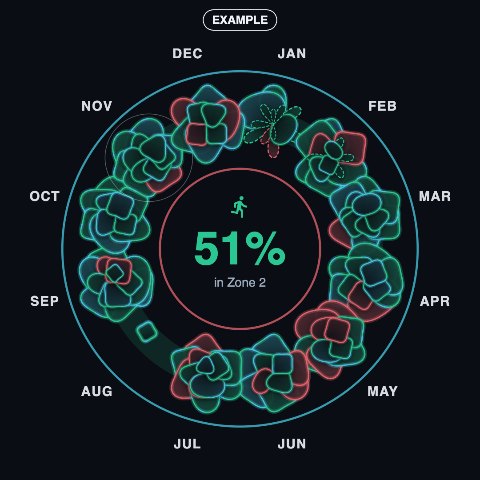
A made-up year of runs, so you can see one first.
On iPhone? Get SlowPace and make your Run Shape straight from Apple Health. No export needed.
Get SlowPace on the App StoreHow do I get my export?
Your Strava export (on the Strava website): Settings → My Account → Download or Delete Your Account → Get Started → Request Your Archive. Strava emails a link, usually within a few hours.
Your Apple Health export (iPhone): Health app → your picture (top right) → Export All Health Data → Save to Files. Then open this page in Safari on the same iPhone and choose the zip.
Your Garmin export: garmin.com account → Data Management → Export Your Data. Garmin emails a link, which can take a few days.
On Android? Use your Strava or Garmin export, as above. If your watch's app shares its runs with Strava, they are already there. Health Connect's own export file can't be read here.
Zone 2 here: · Change method
Your Run Shape
Your reel.
Using age 40. Enter yours for your own Zone 2.
On iPhone? Get SlowPace and make your Run Shape straight from Apple Health. No export needed.
Get SlowPace on the App StoreYour carousel.
Swipeable 4:5 slides for an Instagram or LinkedIn post.
How your lap is made
Every run is a loop.
Each run becomes a loop.
The route you ran is traced, turned to point outward from the centre and rounded into a loop. Runs with no route, such as treadmill runs, get a dashed loop, longer for longer runs.
A month of loops makes a circuit.
One run is one loop, and a month with more kilometres makes a bigger circuit. About 60 km in a month is a full circuit.
Your circuits make your Run Shape.
The circuits sit around the SlowPace mark like a clock, January just after the top. Months with no runs keep their place as a dashed circle.
Colour is your heart rate.
in Zone 2, below it, above it. Runs without heart rate fade from emerald to cyan through the year.
The number in the middle
is the share of your running time spent in Zone 2. The zone starts from your age with the 180 formula. "Change method" opens the Zone 2 calculator, and your Run Shape redraws when you come back.
Cities.
If you switch them on, each month shows the city you ran in most. Only the name is shown.
Your file is read inside this browser and is never uploaded: no map, no coordinates, no account. City names from GeoNames (CC BY 4.0). We count page visits only, nothing about you or your file. Privacy
Questions
Your running year, answered.
How do I turn my Strava export into a year in review?
Request your archive from Strava (see "How do I get my export?" above), then choose the .zip here. Your running year is drawn in this browser in a minute or two. The file is not uploaded.
Can I use my Garmin or Apple Watch runs?
Yes. Use your Garmin export for your Garmin running stats for the year. Apple Watch runs are in your Apple Health export from iPhone.
How much of my running was in Zone 2?
That is the number in the middle of your Run Shape: the share of your running time with your heart rate in Zone 2. The page works out your heart rate zones for the year from your age with the 180 formula; "Change method" lets you use another method.
What is in my running recap for 2026?
A reel of your year, a story image, a square image and a carousel: your runs, distance, time in Zone 2, your longest run and your biggest month.
Is it free?
Yes, always. No account and no sign-up.
Run slow. Run far.
SlowPace watches your heart rate and cadence while you run and tells you one thing at a time.
Get SlowPaceFirst 5 guided runs free.